
Check SIM Owner Details in Pakistan – Complete Information & Security Guide
SIM registration in Pakistan is now linked to CNIC. So, there is a real identity behind every SIM. In this guide, we will tell you how you can check how many SIMs are registered in your name, who owns a number, and how to protect your identity from fraud. We have given all the information based on the official PTA rules and the latest updates of 2026. Here you will also get legal methods, security tips, and common misconceptions. Our only aim is to provide you with safe and accurate information so that you can prevent misuse of your SIM and CNIC.
What Are SIM Owner Details? The 60-Second Answer
SIM Owner Details is actually a record that tells how many SIMs are registered on your CNIC number and which mobile companies they belong to. This record is stored in the PTA system and it links each SIM card to the CNIC of the person who obtained that SIM by getting that SIM verified through biometrics using their fingerprints.
In simple words, when you check your CNIC number, you get to know how many SIMs are active in your name. This facility only allows you to see your own information, it is neither possible nor legal to find out the details of someone else’s number or CNIC.
The Fastest Legal Method (It Takes 30 Seconds)
The fastest and legal way to check the SIM registered on your CNIC is through SMS. Simply send your 13-digit CNIC number without the dash to 668 from your mobile. Within 30 seconds, you will receive a message from the PTA. This message will tell you how many SIMs are in your name and on which networks. This service is absolutely free and approved by the PTA itself. Remember, you will not get other people’s SIM owner details through this method. This is only for your own security check. If the message does not arrive, check the network balance or try again after a while.
Free SIM Owner Details Tool
Check registered SIM details across all Pakistani networks instantly.
For newer premium data, contact us on WhatsApp.
اگر ویب سائٹ پر ڈیٹا نہ ملے تو ایپ ڈاؤن لوڈ کریں۔
Download on Google PlayWhy Trust This Guide
This website is specially designed for the purpose of providing accurate and reliable knowledge related to SIM owner details to the general users of Pakistan in one place. We do not store any kind of personal data nor is any user’s ID card number stored anywhere. The source of every information given on this website is the official policies and notifications of PTA, and these details are updated from time to time as per the new laws. Our main aim is to make people aware so that they can avoid being cheated by fake websites and illegal services, and trust only those methods that are officially recognized.
How This Website Helps Users
This website is a simple help center for ordinary users. If you are not understanding how to SMS to 668 or whether it is better to go for a franchise, then we give a step-by-step guide. We tell you how to avoid fraud calls and fake PTA messages.
There are separate sections for overseas Pakistanis, students and business users. Our job is not just to provide information, but also to keep you safe. Whenever a new fraud or new PTA law comes out, we are the first to alert you so that you can take action in time.
Our Editorial & Fact-Verification Standards
Every post of ours goes through 2 levels of checks before it is published. First, we confirm the information with the official PTA website and gazette notification. At the second level, we match it with the customer service of mobile networks. If any law changes in 2026, we update the article within 48 hours. We never source unverified Telegram groups or YouTube videos. Our policy is clear. Only official data, only truth. That is why readers trust us.
What You Will Learn On This Website
On this website, you will find every essential topic related to SIM info. in one place. From the registration procedure to privacy protection tips, everything is explained in simple and easy language. Whether you are checking your SIM details for the first time or looking for a solution to a problem, each section here is organized to guide you.
SIM Registration Process
Here you will know how to register a new SIM in Pakistan, what is the biometric verification method, and what documents are required. Common mistakes during registration and how to fix them are also explained.
PTA Verification Methods
This section teaches you all the official PTA verification methods, including SMS codes, official website, and visiting the franchise to get verified. When and how each method should be used is also explained.
CNIC & SIM Information
Here it is explained what is the relationship between CNIC and SIM, how many SIMs can be registered on a CNIC, and what precautions are necessary to keep your CNIC safe.
Mobile Network Guides
This section provides separate guidance for each major mobile company in Pakistan, such as each network’s own verification code, helpline number and special instructions.
Privacy & Security Tips
Here you are given practical ways to keep your SIM and CNIC safe, such as never sharing OTP and recognizing fake calls, so that you can stay safe from fraud and online scams.
Latest PTA Updates
This section keeps you informed about new policies and rules issued by PTA from time to time, so that the user always gets the latest and correct information, instead of old or incorrect rules.
Important Disclaimer
All the information provided on this website is for guidance only. Our aim is to make you understand the rules and safe practices of PTA. We are not affiliated with any government agency nor do we have any private database. Please verify with official sources before taking any step. If you are a victim of any legal issue or fraud, report it to PTA or FIA immediately.
The purpose of this page is to inform people about their rights and available government services, and not to encourage any private service. The points given below further explain how this website works and how the user’s privacy is ensured.
Educational Purpose
The content of this website is made purely for educational purposes. We explain to you how the PTA system works and how to protect your identity. The instructions given here are not intended to harm anyone. Please use this information only for legal and positive purposes. We do not allow or support its use in illegal activities.
No Personal SIM owner details Database Access
We do not have any private data of PTA, NADRA or any mobile company. We cannot check the name, CNIC or address of any number. Any website or app that claims this (SIM owner details) is illegal. We only provide the methods that PTA has officially released for the public. So do not rely on any third-party service.
Respect User Privacy
We fully respect the privacy of users. You will not be asked for any personal information like CNIC, number or address on our website. We do not collect anyone’s data or share it with any third party. If you fill any form, it is only to help you. Your data will always be safe.
Use Official PTA Services
Users are always advised to use only official PTA facilities, such as SMS codes or official websites, for any kind of SIM-related verification. Relying on any unofficial or private website is not only unsafe but can also lead to legal issues at times. Official sources are always the safest and most trusted option.
Pakistan Telecommunication Authority (PTA) and SIM Management
The Pakistan Telecommunication Authority (PTA) is the regulatory authority for the telecommunications sector in the country. It ensures the implementation of mobile networks, SIM registration, consumer rights, and telecom laws. Before activating every new SIM in Pakistan, it is required to be registered with a valid identity document and biometric verification. This system helps in preventing illegal SIMs, identity misuse, and telecommunications fraud.
PTA's Role in SIM Registration
PTA ensures that every mobile SIM is registered only in the name of the original user and his identity is proven through biometric verification. All mobile operators have to follow the rules set by PTA so that the record of every activated SIM remains secure and verifiable.
Why PTA Regulates Mobile SIMs
The main objective of SIM registration regulations is to prevent identity fraud, financial fraud, cybercrime, and illegal activities. When each SIM is registered in the name of its real user, it also makes necessary investigations easier for law enforcement agencies, while the identity and mobile security of the general user are better protected.
PTA SIM Verification System Explained
PTA’s SIM verification system establishes a connection between mobile operators, biometric verification, and identity records so that the registration of each new SIM is completed correctly. Through the same system, the user can also check the number of SIMs registered on his/her identity card from official sources and take timely action in case of any unauthorized registration.
Latest PTA SIM Policies
PTA keeps improving its policies related to SIM registration and user security from time to time. In recent years, users have been urged to use each SIM only in their own name, regularly verify SIMs registered to their CNIC, and immediately report any suspicious or unauthorized SIM to the relevant mobile operator.
SIM Registration Process in Pakistan
Buying a SIM in Pakistan is now a very strict and secure process. According to the PTA law, every SIM cannot be activated without CNIC and biometrics. When you take a SIM, your fingerprint, photo and CNIC are scanned at the franchise. All this data immediately goes to the PTA system. That is why no illegal SIM can be created easily now. This entire process is completed in just a few minutes. Below we have explained step by step how registration is done and what things to take care of.
How a New SIM Is Registered
When you go to get a new SIM, the franchise will first ask for your original CNIC. After this, your thumb will be placed on the biometric machine. If the verification is successful, the SIM will be registered in your name. Without biometrics, the SIM will not be active.
Biometric Verification Process
NADRA database is used in biometrics. The machine matches your fingerprint with the CNIC record. If the fingerprint does not come clear, then 2-3 retries are made. In some cases, a face scan is also required. This process is mandatory to prevent fraud.
Documents Required for SIM Registration
Only 2 things are required for SIM registration. 1. Your original and unexpired CNIC or B-Form. 2. Your fingerprint. Photocopy or old CNIC is not acceptable. NICOP is required for overseas Pakistanis.
SIM Activation Timeline
Usually the SIM gets activated in 10 to 15 minutes after biometrics. It may take up to 2 hours on some networks. If the SIM does not work within 24 hours, contact the franchise immediately or call the helpline.
Common Registration Errors
People often face these problems during SIM registration:
- Fingerprint mismatch: If your hands are dirty or you are old, the machine does not read the print.
- CNIC expiration: SIM is not registered on expired CNIC.
- More than 5 SIMs on one CNIC: If the PTA limit is reached, you will not get a new SIM.
- Data entry error: The franchise makes a mistake in the name or CNIC number.
- Downtime: Registration stops due to network or PTA server shutdown.
How to Correct Registration Mistakes
Follow these steps to correct the registration error:
- Go to the franchise: Take your original CNIC and SIM and go to the franchise of the same network.
- Get biometrics done again: If there is a problem with your fingers, wash and dry your hands and apply them again.
- Get CNIC updated: Get your expired CNIC renewed from NADRA first.
- PTA helpline 0800-55055: If the franchise does not resolve the issue, call PTA.
- Surrender the SIM: If the limit for one CNIC is reached, deactivate the old SIM and get a new one.
Why Every SIM Is linked to a CNIC
In Pakistan, it is a mandatory law of PTA to link every SIM to a CNIC. The main reason for this is security. When every number is linked to a real identity, fraud, threatening calls and illegal activities become easier to trace. SIM Swap and OTP fraud have also been reduced by this system. CNIC linking also shows how many SIMs are in a person’s name. If any SIM is misused, law enforcement agencies can immediately reach the real owner. That is why it is now not possible to get a SIM without a CNIC.
How CNIC Verification Works
While buying a SIM, the franchise scans your CNIC and gets your finger on a biometric machine. This data is immediately matched with the NADRA system. If the name, finger and photo match, the SIM becomes active. This entire process is done through the PTA server so that no fake registration can be done.
Maximum SIMs Allowed on One CNIC
A maximum of 8 SIMs can be registered on one CNIC, including 5 regular calling SIMs and 3 SIMs reserved for internet data only. This limit applies to all mobile companies combined, i.e., it is not limited to just one company. If this limit is crossed, the system automatically blocks further SIM registrations.
How to Keep Your CNIC Secure
Keeping your CNIC safe has become more important than ever in today’s era, because SIMs, bank accounts, and other important facilities are registered in your name on the basis of this card. Never send a photo of your CNIC to anyone unnecessarily, nor give the actual card to an unknown person. Check your SIM card number from time to time through 668 so that if an unknown SIM is registered on your card, you can immediately know.
Risks of Misusing Someone Else's CNIC
Misusing someone else’s CNIC can be very dangerous:
- Creation of a fraudulent SIM: Someone else can take a SIM in your name and use it for crimes
- Risk of bank account: CNIC can be used to create a fake bank account or Easypaisa/Jazz Cash.
- Legal issue: If any illegal work is done with this SIM, an FIR will be filed in your name.
- Financial scam: Loans or online loans can be applied in your name.
- Loss of privacy: Your data can be leaked and used for blackmail
How to Check the Number of SIMs Registered Against Your CNIC
Checking how many SIMs are registered in your name is now very easy. PTA has given 4 official methods for this so that everyone can keep their identity safe. This check is free and is done in a few seconds. If you see an unfamiliar SIM in your name, you can immediately block it. Remember that this service only tells you how many SIMs are on your CNIC. Checking someone else’s data is not possible and is illegal. Below we have explained each method step by step.
Official PTA Methods
PTA has made 4 official methods for the public. 1. SMS to 668. 2. PTA’s official website. 3. Mobile network app. 4. Visiting the nearest franchise. All these methods are linked to the central database of PTA. Therefore, the result is 100 percent accurate.
SMS Verification Method
This is the fastest method. From your mobile, send your CNIC number to 668 without the dash. Within a few seconds, you will get a response with the registered SIMs in your name and the network name. This service is free on Jazz, Zong, Telenor, Ufone and ONIC.
Online Verification Method
Go to the official website of PTA cnic.sims.pk. There, enter your CNIC number and mobile number. After that, you will get a code. As soon as you enter the code, all the SIMs will appear. This method works on both computers and mobiles.
Visiting a Franchise
If you are not able to understand online, then go to the franchise of your network. Take your original CNIC with you. After the biometrics, the representative there will give you a printout in which it will be written how many SIMs are in your name. This method is best for senior citizens.
Choose the Correct Verification Method in Seconds
Everyone’s needs are different. That’s why PTA has given 4 different methods. If you want to check at home, then SMS is better. If you need a document, then go for a franchise. Below we have selected the easiest method for every type of user so that you can decide without wasting time.
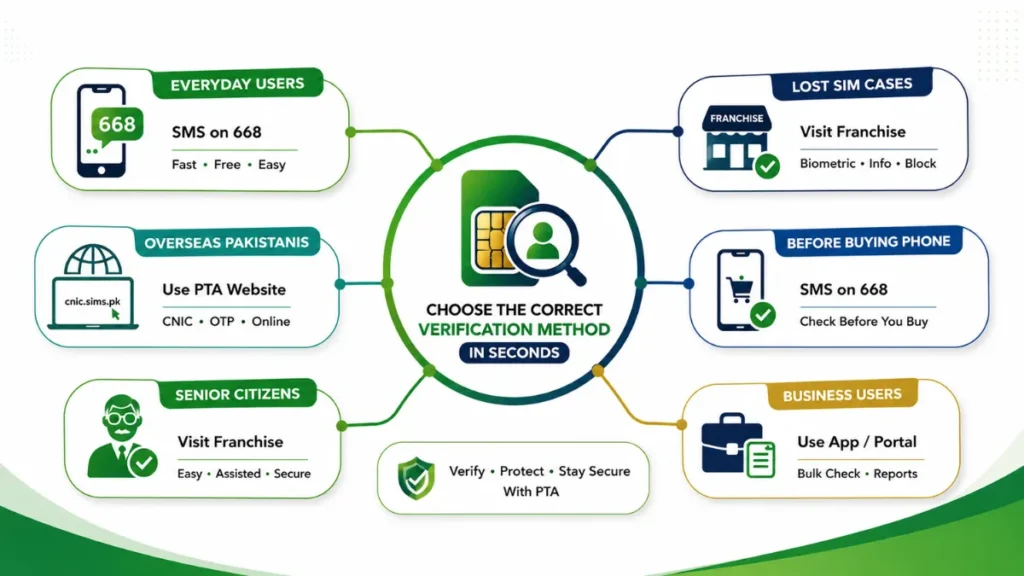
Best Method for Everyday Users
SMS on 668 is the best for ordinary users. It is free, results come in 30 seconds and no internet is required. Just send the CNIC number and you will know immediately.
Best Method for Overseas Pakistanis
PTA’s website cnic.sims.pk is best for overseas Pakistanis. They can also check from abroad through CNIC and OTP. For this, internet and an active Pakistani number are necessary.
Best Method for Lost SIM Cases
If the SIM is lost, go for a franchise immediately. There, after biometrics, you will be told how many SIMs there are. You can also get the lost SIM blocked. This is the safest method.
Method before Buying a Used Phone
Before buying a used phone, send an SMS to 668. Remove the SIM card from the phone and send your CNIC. This will show who owns the phone and whether any illegal SIM cards are inserted.
Method for Business Users
For business users, the network’s official app or web portal is better. There they can check multiple CNICs at once and can also download the report. This method is easy to keep records.
Easy Method for Senior Citizens
It is easiest for senior citizens to go to a franchise. There, the representative himself does the biometrics and gives a printout. They do not need to use mobile or internet.
Comparison Table
| Situation | Recommended Method | Time Required | Internet Needed |
|---|---|---|---|
| Everyday Users | SMS to 668 | 10 Seconds | No |
| Overseas Pakistanis | PTA Website (cnic.sims.pk) | 2 Minutes | Yes |
| Lost SIM Cases | Visit Franchise | 15 Minutes | No |
| Buying Used Phone | SMS to 668 | 10 Seconds | No |
| Business Users | Network App / Web Portal | 5 Minutes | Yes |
| Senior Citizens | Visit Franchise | 15 Minutes | No |
Common SIM Verification Problems and Their Solutions
Sometimes some technical issues arise during SIM verification. Like SMS not responding, website not opening or biometric failure. No need to panic. These issues are common and their solution is very easy. In most cases, the problem is due to network, CNIC expiry or server. Below we have written the reason for each common issue and its quick solution so that you can complete your work without any hassle.
SMS Code Not Working
If SMS is not responding on 668, first make sure you have enough mobile balance. Enter your 13-digit CNIC without dashes. If the issue continues, wait for 24 hours and try again or visit your nearest franchise for assistance.
SMS SolutionPTA Website Not Opening
If the PTA portal is loading slowly, clear your browser cache or disable any VPN service. You can also switch to a WiFi connection instead of mobile data and try again after a short time.
PTA PortalBiometric Verification Failed
Fingerprint verification may fail because of dry skin, injuries or age-related issues. Wash and dry your hands before trying again. If needed, use another thumb or complete face verification where available.
Biometric HelpUnknown SIMs on CNIC
If you find an unknown SIM registered on your CNIC, immediately visit the relevant network franchise with your original CNIC. Request SIM blocking and submit a complaint through PTA for further action.
Security AlertSIM Not Showing in PTA Record
A newly activated SIM may appear in PTA records after 24 hours. If it is still missing after 48 hours, contact the franchise where you purchased the SIM to update your registration.
SIM StatusVerification Taking Too Long
Verification delays are usually caused by temporary network or PTA server issues. Most requests are completed within two hours. If the delay exceeds 24 hours, contact customer support and obtain a complaint number.
Verification HelpWhat to Do When Official Services Are Temporarily Unavailable
If PTA services are temporarily down, don’t panic. Do this:
- Wait a while: Most servers are back up within 1-2 hours
- Try an alternative: If the website is down, SMS 668
- Visit a franchise: In an emergency, visit the nearest franchise and get a manual check
- Call the PTA helpline: Get an update on 0800-55055 when the service will be restored
- Check social media: Service updates are posted on PTA’s official Facebook/Twitter
SIM Data Information vs. SIM Data vs. SIM Owner Details — What's the Difference?
Most people consider SIM Information, SIM Data and SIM Owner Details to be the same, but these three are different things. SIM Information means your SIM number and network. SIM Data includes call history and internet usage. While SIM Owner Details contains the CNIC and name on which the SIM is registered. According to the PTA law, the general public can only check their SIM Information. Owner Details can only be requested by law enforcement agencies. Understanding these differences is important to avoid fraud.
SIM Data Information Explained
SIM Information includes your mobile number, network name and SIM status. You can see this information yourself from your phone settings or network app. This data is not public and does not reveal anyone's identity.
SIM Owner Details Explained
SIM Owner Details contains the CNIC number, name and address on which the SIM is registered. This information can only be obtained by the SIM owner or security agencies through PTA. A common person cannot retrieve the Owner Data of another person.
SIM Registration Data Explained
SIM Registration Data is the complete record that is held by PTA and NADRA. It includes biometrics, registration date and activation location. This data is used for fraud prevention and legal cases and is not given to common users.
Common Misunderstandings about Sim Owner Details Terms
People often make these mistakes about these terms:
- “Someone’s name will be revealed from 668”: 668 only tells how many SIMs are on your CNIC, it does not give the name of anyone else
- “SIM number will give the address”: The number only shows the network, not the owner’s address
- “Franchise owner can retrieve someone’s data”: No one can give Sim Owner Details without biometric and legal reason
- “SIM Data and Owner Data are the same”: Data is usage and Sim Owner Details is identity, both are different
- “Real Sim owner details can be found from online websites”: These websites are fake and commit fraud
How Pakistan's SIM Verification System Works
Earlier, people used to take SIMs without any check. But now it is not like that. Now PTA and NADRA have come together to create a complete system. When you go to the shop, first your CNIC is scanned. Then your thumb is placed on the machine. Both these things are immediately matched with NADRA’s records. If everything is fine, the SIM starts working in 5 to 10 minutes. Due to this system, fake SIMs have almost disappeared.
How Verification Records Are Managed
As soon as your SIM is created, all the data goes to the central server of PTA. It includes your name, CNIC number, SIM number and date. Jazz, Zong, Telenor, Ufone’s systems are all connected to PTA. Therefore, no wrong entry is possible. This record is very secure and remains there for years.
What Information Is Stored, and What Information Is Never Public
The system only keeps information about whose name this SIM is in. That is, name, CNIC and SIM number. Your calls, messages or internet history are not saved here. And you cannot get any other person’s sim details. Only the court or the police can ask for it.
Biometric Verification (BVS) Explained
BVS means verification by thumb. Since 2015, it has been a law that no SIM will be available without a thumb. The machine at the shop is directly connected to NADRA. Its only purpose is that the SIM is made in the name of the real person. Due to this, fraud and threatening calls have reduced a lot.
How Fingerprint Verification Works
You place your thumb on the machine. The machine takes a picture of it and sends it to NADRA. There, it checks in 10 seconds whether this mark matches the mark on your card or not. If it matches, “Verified” appears on the screen and the SIM becomes active.
What Happens If Verification Fails?
Sometimes the machine does not read the thumb. This can be due to dirty hands, cuts or being old. The machine tries 3 times first. If still not successful, the second hand is tried. Finally, you have to go to NADRA and get your finger updated.
When Face Verification May Be Required
Face verification is not available everywhere. It is only for those whose thumb is not visible at all. It is mostly used for elderly people. In this, a picture is taken from the camera and matched with the NADRA picture.
Why You Should Regularly Check Your SIM Owner Details
Checking your SIM detail has become very important now. Sometimes you don't even know about your CNIC and a SIM is created. This can lead to fraud, threats and bank problems. So keep checking your sim info every 1-2 months so that no one can misuse it.
Prevent Unauthorized SIM Registration
Some people create SIMs on your CNIC in a fake way. If you keep checking the record, you will immediately know which SIM is in your name. You can avoid a big problem by getting unnecessary SIMs closed.
Protect Your Digital Identity
Nowadays, every account is linked to a SIM. If someone uses your SIM, they can also open your WhatsApp, Facebook and Gmail. Checking the sim detail keeps your online identity safe.
Avoid Financial Fraud
Fraudsters take a SIM in your name and withdraw money from the bank. They also ask for OTP on the same SIM. If you check on time, you will know that a SIM is being misused and you can get it blocked immediately.
Secure Banking Apps
The OTP of your bank app and ATM comes on your SIM. If someone else has the SIM, they can open your account. You can make banking safer by checking your records.
Protect Mobile Wallets
Wallets like Easypaisa and JazzCash also work with SIM. If the SIM is not in your name, anyone can withdraw your balance. Checking records is the easiest way to save your money.
Prevent Identity Misuse
Misuse of your CNIC can also be used in crimes. If someone does something wrong by taking a SIM in your name, the police will reach you first. Therefore, it is important to check so that your name is clear.
Stay Updated With PTA Records
The PTA system keeps updating over time. Sometimes old SIMs also remain in the record. By checking, you know which SIM is blocked and which is working. This keeps the record clean.
Common Pak Sim Data Frauds in Pakistan
Nowadays, SIM frauds have increased a lot in Pakistan. Fraudsters come up with new ways every day to steal people's data and withdraw money. These people fool simple people by using the name of banks, PTA and NADRA. Sometimes there is a fake call, sometimes a message and sometimes a website. If you do not recognize these tricks, your account may be empty. Therefore, it is important that everyone knows about these common frauds and be careful.
SIM Swap Fraud
The fraudster calls the company with your CNIC data and says that the SIM is lost. Then he takes out a new SIM for your number. After that, he gets access to your bank OTP and WhatsApp.
OTP Verification Scams
This is the most common fraud. The caller introduces himself as a bank employee and says that your account is being blocked. He asks you for the OTP. As soon as you tell him, he immediately transfers your money. Remember, the bank never asks for OTP.
Fake PTA Calls
You get a call and the person in front says that I am talking to PTA. Your SIM is being blocked, tell me your CNIC number. This is all a lie. PTA never calls anyone and asks for data. Hang up such a call immediately.
Fake NADRA Messages
A message comes on your phone that your CNIC has been blocked. A link is given below. As soon as you open the link, they steal NADRA sim owner details. NADRA never sends links through SMS. Delete such messages.
Social Media SIM Data Scams
You often see advertisements on Facebook and WhatsApp that claim that someone's SIM details can be found by entering their number. This is a completely false claim, and entering your number or ID card in such services puts your data at risk.
Fake SIM Owner Details Online Check PTA Websites
There are many websites on the internet that claim to tell you for free how many SIMs are in your name. But as soon as you enter your CNIC, they steal all the information. Always use only the official 668 service of PTA.
Loan App SIM Frauds
These apps promise instant loans at low interest rates. To get a loan, they ask for your SIM, gallery and contact permissions. Later, they blackmail you and say that you should give more money or else they will message your friends. Stay away from such apps.
How to Protect Yourself from SIM Fraud
A little caution is enough to avoid SIM fraud. Fraudsters always take advantage of haste and fear. They ask for your data in the name of the bank, PTA or NADRA. If you share any information over the phone, your account may be at risk. So never share OTP, CNIC or PIN with anyone. Verify every call and message first. Also, install extra security in your bank and mobile wallet. These 4 small steps can save you from big losses.
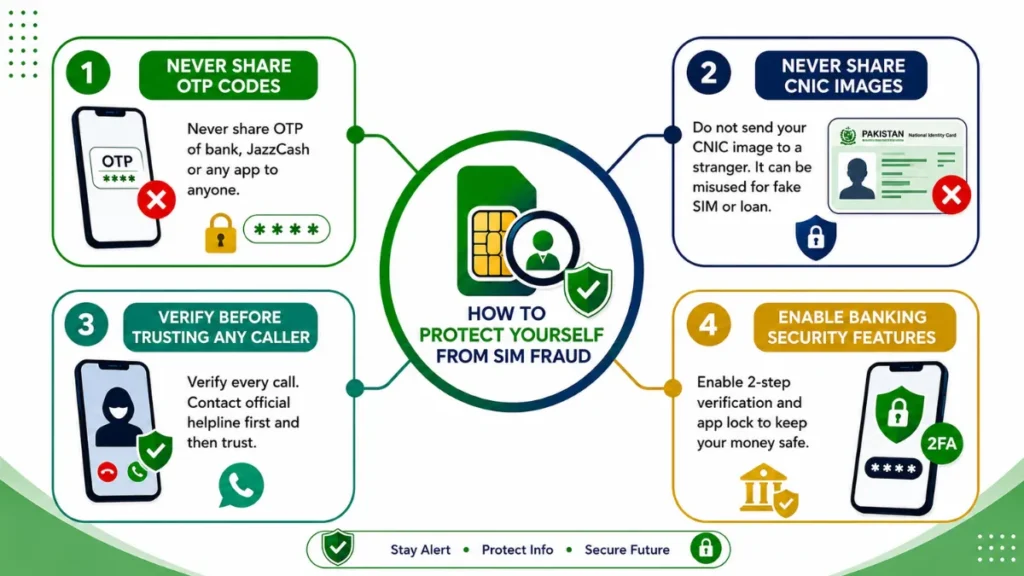
Never Share OTP Codes
Never share OTP of bank, JazzCash or any app to anyone. Fraudsters ask for OTP by pretending to be a company employee. Remember, real companies never ask for OTP over the phone. As soon as they get the OTP, they withdraw your money.
Never Share CNIC Images
Do not send a picture of your CNIC to a stranger on WhatsApp or Facebook. Impostors use this picture to create a fake SIM in your name. After that, they can also take a loan in your name. Always keep your CNIC confidential.
Verify Before Trusting Any Caller
If someone calls and says they are a PTA or bank officer, do not believe them immediately. First call the official helpline and verify. Fraudsters try to get your data out of you in a hurry by threatening you. Always think with a cool head.
Enable Banking Security Features
Enable 2-step verification and app lock in your bank app and mobile wallet. With this, even if someone takes your SIM, they will not be able to open your account. These features are free and keep your money safe.
How to Report SIM Fraud or Harassment
If you have been subjected to SIM fraud or blackmail, there is no need to panic. In 2026, the government has made it very easy to report. You can complain online or over the phone from home. Both PTA and NCCIA take immediate action. The sooner you report, the sooner the SIM will be blocked and the fraudster will be caught. Below are the 3 easiest ways through which you can file your complaint.
PTA Complaint Portal
You can file an online complaint by visiting the PTA website. There, enter your CNIC, SIM number and details of the fraud. PTA starts working on the complaint within 48 hours and you also get updates via SMS.
NCCIA/FIA Cybercrime Reporting (Helpline 1991)
For cybercrime or blackmail, call NCCIA’s helpline 1991. You can also report from their website or app. This organization traces the fraudster’s data and takes legal action.
Network Helpline Numbers
If the problem is about blocking the SIM, then call your network’s helpline immediately. Jazz 111, Zong 310, Telenor 345, Ufone 333. They will block the suspicious SIM immediately on your complaint.
Can You Legally Check Someone Else's SIM Owner Details?
No, according to the law, you cannot check someone else's SIM data information. Every citizen's SIM data in Pakistan is private. Only certain government agencies can extract this SIM information for legal reasons. If you try to extract someone's sim detail yourself, it becomes a crime and can be punished under PECA 2016.
What Pakistani Law Allows (PECA 2016 Explained — Sections, Penalties & Your Rights)
PECA 2016 aims to prevent digital fraud. According to this law, checking someone's data without permission is a crime. If someone does so, he can be fined and imprisoned. You have the right to have your data protected.
Section 3 — Unauthorized Access to Information Systems
If someone accesses someone's system or sim data without permission, it is a crime. He can be imprisoned for up to 3 months or fined up to 50 thousand. The punishment increases for repeated offenses.
Section 4 — Unauthorized Data Copying/Transmission
It is a crime to steal someone's data and forward it. This includes SMS, data or SIM information. It can be punished with imprisonment for up to 6 months and a fine of up to 1 lakh.
Section 16 — Unauthorized Use of Identity Information
If someone uses your CNIC or SIM to commit fraud, it is identity theft. The punishment is imprisonment for up to 3 years and a fine of 5 lakh. This is the strictest section of PECA.
Strictest penalty under PECASection 17 — Unauthorized SIM Issuance
If someone issues a SIM without biometrics, it is a crime. Action is taken against both the company and the employee. The punishment is 3 years in prison and a heavy fine.
Who Is Authorized to Access SIM Records (PTA, NCCIA, Courts, Operators)
In Pakistan, a common citizen cannot extract anyone’s SIM record. This authority is with only 4 institutions. For PTA regulation, NCCIA for cybercrime investigation, courts in legal cases and network operators can see the sim owner details for verification of their SIM. But even they can see only limited information. Call details or messages are not available without a court order. If someone else asks for the data, it is illegal.
Why Private SIM Databases Are Illegal
Most people think that maybe an app or website can provide sim owner details by creating a private database of SIMs, while the reality is quite the opposite. PTA records are a completely closed system that is not accessible to anyone from the outside, no matter how big the company. Websites that make such claims are either lying or reusing old stolen data. In both cases, using such a service can also put the user in legal trouble.
Latest Official PTA & NADRA Policy Updates
The following updates are based on the latest officially announced policies and public information released by PTA and NADRA. These updates may affect SIM registration, verification, ownership records and CNIC-linked mobile connections. Every mobile user in Pakistan should stay informed to avoid service interruption, identity misuse or legal issues.
Expired CNIC SIMs May Be Blocked
PTA and NADRA have strengthened the verification process for SIMs linked with expired CNICs. If your CNIC expires and remains unrenewed, SIM services associated with that identity may be restricted after the applicable verification process. Users should renew their CNIC promptly and ensure that their mobile operator records remain updated to avoid inconvenience.
365-Day SIM Disowning Policy
PTA has extended the SIM disowning period to 365 days, giving mobile users more time to report SIMs that do not belong to them. If you find an unknown SIM registered against your CNIC, you should immediately visit your mobile operator's franchise or customer service center and submit a disown request. This policy helps protect users from identity misuse and unauthorized SIM registration.
PTA RAABTA WhatsApp Assistant
PTA has introduced the RAABTA WhatsApp Assistant to make public services more accessible. Through this official service, users can obtain guidance regarding SIM verification, complaints, mobile regulations and other PTA-related information without visiting an office. Always use only the officially announced WhatsApp number and avoid unofficial accounts claiming to provide PTA services.
Midnight SIM Sale Restriction
To improve security and reduce fraudulent SIM activations, mobile operators follow strict verification procedures before issuing new SIMs. Customers should always purchase SIM cards from authorized franchises and retailers where biometric verification is completed according to PTA regulations. Avoid buying pre-activated or unverified SIM cards from unofficial sellers, as they may lead to legal or security issues.
Latest Security Recommendations
Always keep your CNIC information up to date and regularly check how many SIMs are registered against your identity. Never share your CNIC copy, biometric information, OTP codes or personal details with unknown individuals or websites. If you notice any unauthorized SIM registration or suspicious activity, contact your mobile operator or PTA immediately through official channels. Following these precautions can significantly reduce the risk of identity theft and SIM-related fraud.
PTA regulations and SIM-related procedures may change over time. Before making any important decision regarding SIM registration, ownership verification or complaints, always confirm the latest information through the official PTA website, your mobile network operator or other authorized government sources.
Why These Updates Matter
Staying informed about the latest PTA and NADRA policies helps you protect your identity, prevent SIM misuse and avoid unnecessary legal or service-related issues. Whether you are checking the SIMs registered on your CNIC, purchasing a new SIM or reporting an unauthorized connection, always rely on official procedures instead of unofficial websites or social media claims.
Reminder: This guide is provided for educational and public awareness purposes only. Regulations and procedures may change over time, so always verify important information through official PTA, NADRA and your mobile network operator before taking any action.
Common Myths about SIM Owner Details
There are many misconceptions about Pak SIM owner details. Social media and YouTube have further spread these lies. The truth is that no ordinary person’s SIM data is public in Pakistan. Below are the 10 most common lies and their truths.
The Truth about "SIM Trackers" and "Live Trackers"
The “SIM Tracker” and “Live Location Tracker” videos on YouTube and TikTok are all deceptions. In reality, no app can extract someone’s location or call history by entering a SIM number. This can only be done by security agencies with a court order. Apps that claim this are either fake or infect your phone with viruses. So do not believe or install any such app.
Fake SIM Data Checker Websites — Warning for Users
If you search on Google, “sim information with number” hundreds of websites named “Free SIM Data Checker” or Sim Owner Details Checker come up. All of them are fake. Their only aim is to steal your data. These websites are not affiliated with PTA. As soon as you enter your CNIC, that data goes to the hacker. Later, you get fraudulent calls with the same data.
How Fake Websites Trick Users
These websites usually use a logo like PTA or a similar name to make the user believe that they are on an official platform. Some sites also show fake results to make the user feel satisfied and not suspicious.
Risks of Entering Your CNIC or Phone Number
As soon as you enter your CNIC and number, that data is sold on the dark web. After that, a fake SIM can be created in your name or bank fraud can occur. You also start getting threatening calls.
Malware and Data Theft Risks
As soon as you click on these websites, a virus is downloaded to your mobile. This virus steals your gallery, contact and bank app data. Sometimes the mobile also hangs and the data is not recovered.
How to Identify Genuine Official Sources
It is easy to distinguish between real and fake sources. First of all, use only the official website of PTA and 668 SMS service. Second, no government agency will ask you for CNIC or OTP over the phone. Third, the website link should end in .gov.pk. If an app is not on the Play Store or has low reviews, do not install it. If in doubt, immediately call the PTA helpline 1715 and verify.
Official PTA Methods vs. Grey-Market "SIM Data" Sites
There are many websites and apps in the market that claim to sell “SIM owner details”. But there is a world of difference between them and the official PTA method. See the full comparison below so you can avoid fraud.
| Feature | Official PTA Methods | Grey-Market "SIM Data" Sites |
|---|---|---|
| Legality | 100% Legal and Approved by PTA | Illegal and Violates PECA 2016 |
| Data Source | Only Your Own CNIC Data | Stolen or Fabricated Data |
| Cost | Free or Low-Cost Official Service | Chargeable Service |
| Information Provided | Only the SIMs Registered on Your Own CNIC | Claims to Reveal Name, Address and CNIC |
| Privacy Risk | Your Personal Data Remains Secure | High Risk of Identity Theft and Data Misuse |
| Support | Official PTA Helpline (1715) Available | No Customer Support After Payment |
| Outcome | Official, Secure and Trustworthy | Fraudulent, Unreliable and Potentially Dangerous |
Build Your Personal SIM Protection Routine
To avoid fraud, checking once is not enough. You have to make it a habit. If you spend 5 minutes every month and do a complete audit every 3 months, 90% of frauds will disappear on their own. Also, have an emergency plan ready so that if there is ever a problem, you can take immediate action.
5-Minute Monthly SIM Health Check
Dial *668# from your mobile every month or SMS your CNIC number to 668. Check how many SIMs are active in your name. If you see any unnecessary SIMs, immediately call the network helpline to deactivate them.
Quarterly SIM Security Audit
Change the password of your bank app, JazzCash, Easypaisa every 3 months. Turn on 2-step verification. Also, delete suspicious apps from your phone and run a security scan of the Play Store.
Emergency Action Plan for Unauthorized SIM Activity
If you feel that your SIM is being misused, don’t panic. Take these 5 steps immediately:
- Immediate Actions to Take: First, get your SIM blocked. Turn off mobile data and Wi-Fi so that the fraudster cannot access it.
- How to Report the SIM: Report on the PTA website or 1715. Call the NCCIA helpline 1991 for cybercrime.
- Visit the Relevant Mobile Franchise: Visit your network franchise and block or reclaim the SIM with biometrics.
- Request Ownership Verification: Get written confirmation from the franchise that which SIMs are now in your name.
- Keep Evidence of Your Complaint: Keep the tracking number, SMS and call records of the complaint. This evidence will come in handy later.
Every Way People Search for This — Mapped to the Correct, Legal Answer
People search for different words on Google to extract SIM owner details. Most websites take advantage of these searches and commit fraud. The fact is that there is only one legal way for a common citizen in Pakistan. Below is the legal answer to each search.
SIM Owner Details by Number
No, you cannot extract someone's name or CNIC by entering the number. This data is only available on the order of PTA, NCCIA and court. Any website that claims this is fake and will steal your SIM data.
SIM Owner Details Online Check
It is illegal to check someone's SIM data online. No PTA website gives other people's data. You can check your data only by *668#. All the rest are fraud sites.
Check SIM by Number / SIM Number Check
"SIM Number Check" only means that this number is active or not. It is not legally possible to check the owner's name. If any app says this, it will take money from you and block it.
SIM Card Owner Details Online
Finding the details of the owner of a SIM card online is a crime under PECA 2016. No legitimate website provides this service. Only fraudsters claim this so that they can grab your CNIC.
SIM Info by Number / SIM Number Information
Only the network and city can be guessed from the number, not the name. It is the job of security agencies to extract the complete information of the owner. The data of private apps is 100% false.
SIM Owner Name by Mobile Number
It is legally prohibited to extract the owner's name from a mobile number. The name that comes on Truecaller is given by the user, not official. So do not trust it.
Pak SIM Data / Fresh SIM Data / SIM Database Pakistan
All the files and apps with the names "Pak SIM Data" and "Fresh SIM Data" are illegal. This is stolen data. Downloading or using such databases is also a crime under Pakistani law.
Live Tracker / SIM Tracker with Name
No app can extract Live Location or Name from a SIM number. This can only be done by law enforcement agencies with a valid court order. Apps claiming this are fake and may hack your phone.
SIM Owner Name Check / Check SIM Name
The only legal way is to check how many SIMs are registered on your own CNIC through the official PTA method. Checking another person's SIM ownership is illegal and may result in legal action.
Check SIM Owner Details by Mobile Network in Pakistan
Each mobile company has its own system and codes, so the same method does not apply to everyone. Below is a separate guide according to each network so that you can easily find the right method according to your SIM. But remember, no network gives data of another person. You can only check SIMs registered on your CNIC.
Jazz SIM Owner Details Guide
- Check from 668 or cnic.sims.pk
- Contact Helpline 111
- Manage number from Jazz World app
Zong SIM Owner Details Guide
- Check SIM count from 668
- Call Helpline 310
- Check status from My Zong app
Ufone SIM Owner Details Guide
- Check from 668 portal
- Get help from Helpline 333
- Check details from My Ufone app
Telenor Pakistan SIM Owner Details Guide
Use 668 or cnic.sims.pk
Contact Helpline 345
- Check My Telenor app account
SCO / SCOM SIM Information Guide
Service in most northern areas
Registration also through biometric
Contact Helpline 355 Do
ONIC Digital SIM Guide (What is ONIC? )
ONIC is actually Pakistan’s first fully digital SIM brand, which does not require you to visit a store or franchise to get one. The entire registration is done through a mobile app, which is why it is especially popular among those who like to do everything online from home.
How is ONIC verified?
To get an ONIC, a user downloads the app, scans their ID card, and completes facial verification via a video call. This process replaces traditional fingerprint verification, but the goal remains the same, i.e. linking the SIM to a real identity. Once the verification is complete, the SIM becomes active immediately.
Is ONIC a separate telecom company?
No, ONIC is not a new or completely independent network, but rather it operates on the infrastructure of existing networks. In simple terms, it is a digital brand that uses existing towers and systems, not its own network. That is why its SIMs can be checked through 668 or cnic.sims.pk in the same way as SIMs of other networks are checked.
Mobile Number Prefix List in Pakistan
In earlier times, by looking at the first part of the number, it was immediately known which company it belonged to. Still mostly the same, but not 100%. However, see the list below for more information.
| Mobile Network | Official Mobile Prefix Range |
|---|---|
| Jazz (Mobilink) | 0300 – 0309 |
| Zong | 0310 – 0319 |
| Ufone | 0330 – 0339 |
| Telenor Pakistan | 0340 – 0349 |
| SCOM (SCO) | 0355 |
| ONIC | ✓ Uses Ufone Network |
Why Prefixes Are No Longer 100% Reliable
Now times have changed. Earlier 0300 meant Jazz and that’s it. Now it is not like that. There is only one reason and that is “number portability”. Now you can take Jazz number and move to Zong. Therefore, it may be wrong to guess by just looking at the prefix.
Understanding Mobile Number Portability (MNP)
Mobile Number Portability, or MNP for short, is a facility under which a user can move to another network while retaining his/her existing number. For example, if someone does not like the service of Jazz, he/she can shift to Zong with the same number, without changing the number. This facility is formally approved by the PTA and has become quite common these days.
How Ported Numbers Affect Prefix Identification
That is why now the prefix does not tell anything. For example, you have a number of 0300 but it is now running on Zong. If you see the prefix and say “this is Jazz”, it will be wrong. The only way to confirm is to call or check the app.
eSIM in Pakistan
Earlier, there was a fear of going to the market for a SIM card, standing in line and losing the physical SIM. Now technology has made this problem quite easy. The era of eSIM has begun in Pakistan too. eSIM means Embedded SIM, that is, a SIM that is already installed inside your mobile. For this, you do not have to get a small plastic card. Just get the QR code from the company, scan it and the SIM is active. The advantage is that you can keep 2-3 numbers digitally in the same phone.
It is also very convenient for travelers because the risk of losing the SIM is gone. PTA had legalized eSIM in Pakistan since 2021 and now Jazz, Zong, Ufone are all providing it. People are now gradually shifting from physical SIM because it is more secure and convenient.
What Is an eSIM?
eSIM is a digital SIM that is connected to the motherboard of your mobile. You cannot see it or remove it. It does the same thing as a normal SIM, i.e. calls, SMS and internet. The only difference is that it requires a QR code to activate it. If you change your phone, you can delete the old eSIM and transfer it to a new phone.
How eSIM Registration Works
The method of getting an eSIM is exactly the same as a normal SIM. First of all, you have to go to your network franchise. There, your CNIC and biometrics will be checked. After verification, they will give you a QR code. You will scan it by going to your phone settings. Your number will be activated in 2 to 5 minutes. No physical SIM is needed in the entire process.
Biometric Verification for eSIM
Here too, the law is the same as for a normal SIM. You will not get an eSIM without biometrics. Your thumb on the franchise will match with the NADRA system. This is so that there is no fraud and no one can make a fake eSIM in your name. So if someone says that you can get eSIM online, then understand that it is a fraud.
Networks That Support eSIM in Pakistan
Currently, 3 major networks are providing eSIM service in Pakistan. Jazz, Zong and Ufone. You can easily get eSIM from the franchise of these three. Telenor is currently testing and will launch it soon. ONIC, which is the digital brand of PTCL, is also providing eSIM. SCOM does not have this facility yet.
Can you check eSIM Owner Details the Same Way?
Yes, of course. The same law applies to eSIM as well. You can check how many eSIMs are active on your CNIC by dialing *668#. But it is illegal to extract the data of someone else’s eSIM. There is no difference between this and a physical SIM.
Choosing the Right Mobile Network
There are 5 major networks in Pakistan and each has its own merits. Some are fast in internet, some are cheap in calling. Some are great in cities, some are great in villages. Therefore, it is very important to consider your needs before choosing a network. Otherwise, you will be worried about the signal and package later.
Best SIM for Fast Internet
If you want speed, Zong is at the forefront. It often comes first in 4G coverage and speed tests. Jazz is also good, especially in big cities. For gaming and YouTube, both Zong and Jazz are the best options.
Best SIM for Calling
Jazz and Telenor are the best for calling. Jazz's minute packages are cheap and the signal is good on every network. Telenor's night and weekend packages are also quite popular. If the family talks a lot, then both of them are budget-friendly.
Best Network for Urban Areas
Almost all networks work well in cities. But Jazz and Zong's 4G coverage is the best. In Lahore, Karachi, Islamabad, both of them have top-class speed and signal. Ufone and Telenor also work well in cities.
Best Network for Rural Areas
Jazz has a strong presence in villages and remote areas. Its tower network is the largest. After that, Telenor also provides a good signal in many places. Zong and Ufone are weak in some places outside cities.
Best Network for Frequent Travelers
If you are traveling a lot, then take Jazz. Because its signals are available in every city, every road. The second option is Telenor. Both have the widest roaming and national coverage. There will be no tension of going to the network while traveling.
Best SIM for Students
Telenor and Ufone are best for students. Both come with cheap internet and social packages. Telenor's YouTube and Facebook packages are very cheap. Ufone's weekly internet offers also fit into the budget.
Best SIM for Business Users
Jazz and Zong are recommended for business. Jazz's customer service and coverage are reliable. Zong's internet speed and business packages are great for professional work. Both also have postpaid and corporate plans.
Jazz vs Zong vs Ufone vs Telenor — Which SIM Is Better?
Picking the “best” SIM in Pakistan really depends on what you need most. No single network wins at everything. Some are fast, some have better coverage, and some are cheaper. Here’s a straight comparison so you can decide easily.
| Category | Jazz | Zong | Ufone |
|---|---|---|---|
| Internet Speed | 4/5 ★★★★☆ | 5/5 ★★★★★ | 3/5 ★★★☆☆ |
| Coverage | 5/5 ★★★★★ | 4/5 ★★★★☆ | 3/5 ★★★☆☆ |
| Call Quality | 5/5 ★★★★★ | 4/5 ★★★★☆ | 3/5 ★★★☆☆ |
| Digital Services | 5/5 ★★★★★ | 4/5 ★★★★☆ | 2/5 ★★☆☆☆ |
| Price / Packages | 3/5 ★★★☆☆ | 2/5 ★★☆☆☆ | 5/5 ★★★★★ |
| Overall Rating | 4.6/5 ★★★★★ | 3.8/5 ★★★★☆ | 3.2/5 ★★★☆☆ |
Best Overall Choice
- Pick Jazz if you want one SIM that does everything well. Best balance of coverage, calls, and services.
- Pick Zong if you live in a city and use a lot of internet.
- Pick Telenor if you need affordable call packages and live outside big cities.
- Pick Ufone if you’re on a tight budget and mostly stay in urban areas.
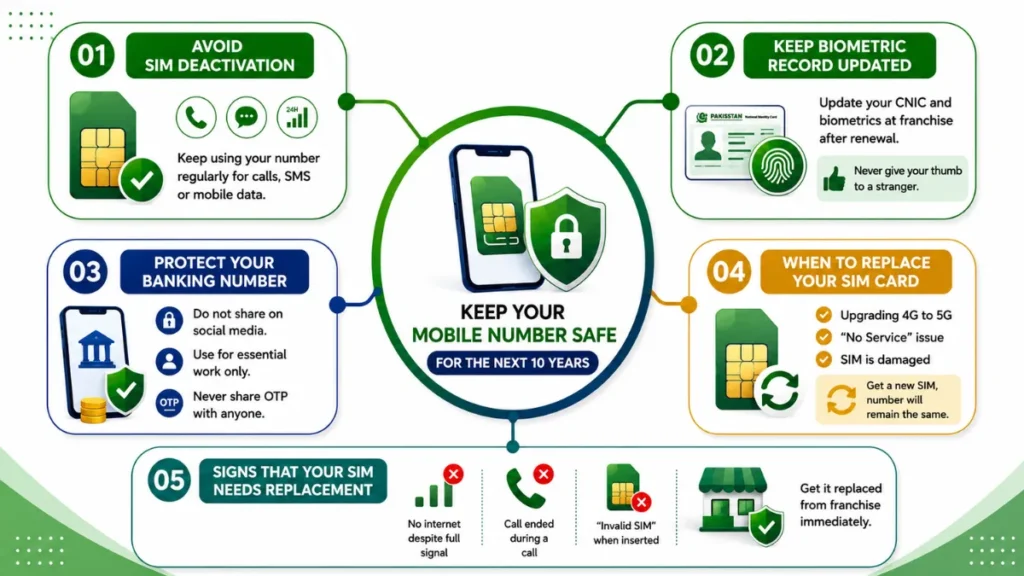
How to Keep Your Mobile Number Safe for the Next 10 Years
Nowadays, a number is not just for calls. It is also linked to your bank, WhatsApp, Facebook and identity card. If the number is blocked or falls into the hands of someone else, it becomes a big problem. Therefore, it is important to keep a few things in mind to keep your number active and safe for 10 years.
Avoid SIM Deactivation
Do not leave your SIM inactive for a long time. If the use of a number is continuously blocked, sometimes the mobile company can block it as per its policy. Keep calling, SMS or using mobile data from time to time to keep your SIM active.
Keep Your Biometric Record Updated
Your CNIC and thumb are the real security of your SIM. If you have renewed your CNIC, then immediately go to the franchise and get your biometrics updated. Otherwise, the SIM may be blocked on old information. And never give your thumb to a stranger to get a SIM.
Protect Your Banking Number
Never share the number of your bank account, JazzCash, EasyPaisa on social media. Use this number only for essential work. And if you get an OTP on it, do not tell anyone. Fraudsters first target the bank number.
When to Replace Your SIM Card
SIM cards also become obsolete after 4-5 years. If you are shifting from 4G to 5G, or the SIM is repeatedly showing “No Service“, or the SIM is broken, then get a new SIM. By getting a new SIM, the number will remain the same, just the card will change.
Signs That Your SIM Needs Replacement
There are some signs that show that the SIM has now stopped responding. Such as not working on the internet despite the signal being full, getting “Call Ended” while making a call, getting “Invalid SIM” when inserting the SIM in the tray. If this happens 2-3 times, immediately get the SIM replaced from the franchise, otherwise it will be blocked one day.
Regional Language Guide (Roman Urdu)
Agar aapko internet par asaan Roman Urdu mein maloomat chahiye to ye guide aapke liye hai. Yahan har cheez simple lafzon mein samjhai gayi hai.
SIM Owner Details Kaise Check Karein 2026
Apni SIM owner details check karna bohat zaroori ho gaya hai. Aksar logon ke CNIC par pata nahi kitni SIMs registered hoti hain. Koi ghalat istemal na kare is liye PTA ne 668 service launch ki hai. Is se aap 2 minute mein check kar sakte hain ke aapke naam par kitni SIMs hain aur wo kis network ki hain. Agar koi extra SIM nazar aaye to foran usay block karwa dein. Ye tareeqa bilkul free aur safe hai.
CNIC Se SIM Number Kaise Maloom Karein
CNIC se SIM number maloom karne ka sab se asaan tareeqa 668 SMS hai. Bas apna 13 digit wala CNIC number bina dash ke 668 par send kar dein. 1 minute ke andar aapko jawab mil jaye ga jis mein aapke naam ki tamam SIMs ki list hogi. Har number ke sath network ka naam bhi likha hoga.
SMS Ke Zariye Apne Naam Pe Kitni SIM Hain Check Karein
Agar aapko pata karna hai ke aapke CNIC par kitni SIMs registered hain to ye kaam SMS se ho jata hai. 668 par khali SMS ya CNIC number bhej dein. PTA ka system foran check karke jawab bhej deta hai. Is mein Jazz, Zong, Ufone aur Telenor ki sab SIMs show ho jati hain. Har 3 mahine baad ye check karna chahiye.
Jazz, Zong, Ufone, Telenor Owner Details Ka Tareeqa
Har network ka apna USSD code bhi hai owner details ke liye. Jazz ke liye _443# milaen, Zong _100#, Ufone _706# aur Telenor _742#. Ye code milane se aapko apni SIM ki basic info mil jati hai. Lekin mukammal CNIC report ke liye 668 wala tareeqa sab se behtar hai kyun ke wo PTA ka official data hai.
Ghalat SIM Apne CNIC Se Remove Kaise Karein
Agar 668 ki report mein koi aisi SIM aa jaye jo aapki nahi hai to ghabraen nahi. Foran apna original CNIC le kar mutaliqa company ki franchise chale jaen. Wahan biometric verification ke baad wo SIM aapke naam se remove kar dein ge. Ye kaam bilkul free hai aur 24 ghante mein ho jata hai. Is se fraud ka khatra khatam ho jata hai.
PTA SIM Information System Ka Istemaal
PTA SIM Information System hukoomat ka official system hai. Is ka maqsad ye hai ke har shehri ko pata ho uske naam par kitni SIMs hain. 668 isi system ke under kaam karta hai. Aap PTA ki website par bhi ja kar CNIC daal kar details check kar sakte hain. Security ke liye har 3 mahine baad check karna behtareen practice hai.
Pak SIM Data Kya Hai Aur Yeh Real Hai Ya Fake?
Internet par bohat si websites aur Telegram channels “Pak SIM Data” ke naam se database bechte hain. Ye kehte hain ke is mein har number ke owner ka naam, CNIC aur address mojood hai. Lekin haqeeqat ye hai ke in mein se 90% data purana, fake ya leak hua hua hota hai. PTA aur NADRA ne saaf kaha hai ke aisi koi public database allow nahi hai. Agar aap in websites se data lete hain to aap khud qanooni mushkil mein phans sakte hain. Is liye hamesha sirf official tareeqa 668 istemal karein.
Pak SIM Database Se Bachne Ka Tarika
Pak SIM Database wali websites se bachne ka sab se behtar tareeqa ye hai ke aap kisi bhi unknown link par click na karein. Telegram ya Facebook par jo log “fresh data” bech rahe hain wo sab fraud hain. Kabhi bhi apna CNIC ya number unko na dein. Sirf PTA ke 668 SMS aur official franchise par bharosa karein. Agar koi force kare to FIA ko report karein.
Fresh SIM Data Websites Ka Sach
“Fresh SIM Data 2026” ke naam se jo websites chal rahi hain unka koi legal proof nahi hai. Ye log purane leak data ko naya naam de kar bechte hain. Is data mein 80% ghaltiyan hoti hain. Aur sab se bari baat ye illegal hai. Agar police ko pata chal gaya to aap par bhi FIR ho sakti hai. Is liye in jhanson mein mat aayen.
Kisi Number Ki SIM Information Ka Legal Tareeqa
Agar aapko kisi number ke owner ka pata karna hai to iska sirf 1 hi legal tareeqa hai. Apne qareebi police station ya PTA office mein darkhwast dein. Wo qanooni wajah hone par hi info nikal kar dein ge. 668 se aap sirf apna CNIC check kar sakte hain, dosron ka nahi. Kisi private app ya website se data lena qanoonan jurm hai.
سم کی تصدیق اور رجسٹریشن کی مکمل رہنمائی
2026 میں پاکستان میں موبائل سم کی رجسٹریشن اور تصدیق کرنا ہر شہری کے لیے لازمی قرار دے دیا گیا ہے۔ اس کا مقصد فراڈ، دہشت گردی اور غیر قانونی استعمال کو روکنا ہے۔ پی ٹی اے کے قوانین کے مطابق ہر سم بائیو میٹرک کے ذریعے ہی ایکٹیو ہو سکتی ہے۔ اگر آپ اپنی سم کی تفصیلات چیک نہیں کرتے تو آپ کے شناختی کارڈ پر کوئی بھی غیر قانونی سم ایکٹیو ہو سکتی ہے۔ اس لیے ہر 3 ماہ بعد اپنا ڈیٹا چیک کرنا بہت ضروری ہے۔ یہ رہنمائی آپ کو بتائے گی کہ سم کیسے چیک کریں، شکایت کہاں کریں اور اپنی معلومات کو محفوظ کیسے رکھیں۔
اپنے شناختی کارڈ پر رجسٹرڈ سمز کیسے چیک کریں؟
اپنے شناختی کارڈ پر رجسٹرڈ سمز چیک کرنا بہت آسان ہے۔ اپنا 13 ہندسوں والا شناختی کارڈ نمبر بغیر ڈیش کے 668 پر ایس ایم ایس کر دیں۔ چند سیکنڈ میں پی ٹی اے کی طرف سے جواب موصول ہو جائے گا۔ اس میسج میں آپ کو پتہ چل جائے گا کہ آپ کے نام پر جاز، زونگ، یوفون اور ٹیلی نار کی کتنی سمز ایکٹیو ہیں۔ اگر کوئی غیر ضروری سم نظر آئے تو فوراً متعلقہ کمپنی کی فرنچائز سے رابطہ کریں۔
غیر مجاز سم کی شکایت کہاں اور کیسے کریں؟
اگر 668 کی رپورٹ میں کوئی ایسی سم نظر آئے جو آپ کی نہیں ہے تو فوراً ایکشن لیں۔ سب سے پہلے اپنا اصل شناختی کارڈ لے کر متعلقہ نیٹ ورک کی فرنچائز پر جائیں اور بائیو میٹرک کے ذریعے وہ سم بند کروا دیں۔ اگر وہاں مسئلہ حل نہ ہو تو پی ٹی اے کی ہیلپ لائن 0800-55055 پر کال کریں یا پی ٹی اے کی آفیشل ویب سائٹ پر آن لائن شکایت درج کروا دیں۔
جعلی سم ڈیٹا ویب سائٹس سے کیسے بچیں؟
انٹرنیٹ پر بہت سی ویب سائٹس اور ٹیلی گرام چینلز "سم ڈیٹا" بیچ رہے ہیں۔ یہ سب جعلی اور غیر قانونی ہیں۔ یہ ڈیٹا پرانا اور لیک شدہ ہوتا ہے۔ ان ویب سائٹس سے ڈیٹا لینا یا بیچنا قانونی جرم ہے۔ اس لیے کبھی بھی کسی غیر معروف لنک پر کلک نہ کریں اور نہ ہی اپنا شناختی کارڈ نمبر کسی کو دیں۔ صرف پی ٹی اے کا 668 سسٹم مستند ہے۔
سم کی بائیو میٹرک تصدیق کیوں ضروری ہے؟
بائیو میٹرک تصدیق اس لیے ضروری ہے تاکہ ہر سم صرف اصل مالک کے نام پر رجسٹرڈ ہو۔ اس سے موبائل فراڈ، بینکنگ فراڈ اور دیگر جرائم میں بہت کمی آئی ہے۔ اگر آپ کی سم بائیو میٹرک کے بغیر ہے تو وہ کسی بھی وقت بند ہو سکتی ہے۔ اس لیے بہتر ہے کہ آپ قریبی فرنچائز جا کر اپنی تمام سمز کی بائیو میٹرک اپ ڈیٹ کروا لیں تاکہ مستقبل میں کوئی پریشانی نہ ہو۔
اپنے موبائل نمبر اور شناختی معلومات کو محفوظ کیسے رکھیں؟
اپنا موبائل نمبر اور شناختی کارڈ کی کاپی کبھی سوشل میڈیا یا واٹس ایپ گروپس پر شیئر نہ کریں۔ اگر کوئی نامعلوم نمبر سے کال کر کے او ٹی پی یا پاس ورڈ مانگے تو ہرگز نہ دیں۔ بینک یا کوئی کمپنی کبھی فون پر او ٹی پی نہیں مانگتی۔ اپنے فون پر اسکرین لاک اور ٹو سٹیپ ویریفیکیشن لازمی لگائیں۔ چھوٹی سی احتیاط آپ کو بڑے نقصان سے بچا سکتی ہے۔
ضروری ہدایات
ہماری ویب سائٹ کسی بھی پاکستانی سرکاری ادارے، ٹیلی کام کمپنی یا نجی ادارے سے منسلک نہیں ہے۔ اس ویب سائٹ کا مقصد صرف عوام کو درست معلومات فراہم کرنا، قانونی طریقۂ کار سے آگاہ کرنا اور محفوظ رہنمائی دینا ہے۔ ہم کسی بھی غیر قانونی سم ڈیٹا، ذاتی معلومات یا نجی ریکارڈ تک رسائی فراہم نہیں کرتے۔ ہمیشہ صرف سرکاری ذرائع اور متعلقہ اداروں کی ہدایات پر عمل کریں۔
Common Questions About SIM Owner Details in Pakistan
How to Check SIM Owner Details in Pakistan?
SMS your 13-digit ID card number without the dash to 668. You will receive a response from PTA within a minute, detailing all the SIMs registered in your name.
How Many SIMs Are Registered on My CNIC?
Send your CNIC number to 668. PTA will immediately tell you how many total SIMs of Jazz, Zong, Ufone and Telenor are active on your CNIC.
How Can I Verify SIM Registration on My CNIC?
668 is the only official way to check SIM registration. Send your CNIC number to it. All the numbers will be returned in response. If there is any illegal SIM, contact the franchise immediately.
How to Check the Number of SIMs on My ID Card?
Write your ID card number and send it to 668. You will get a complete report in a few seconds. It will have the number of SIMs of each network written in it. This service is available for Rs 2 and every citizen should check this every three months.
What Is the Official PTA Method to Check SIM Ownership?
The official and authentic method of PTA is only 668 SMS service. Apart from this, no website or app is legal. You can instantly know how many and which SIMs are registered in your name by sending your ID card number.
How to Find Out Who Owns a SIM Card in Pakistan?
It is illegal in Pakistan to find out the owner of another person’s number. The law only allows you to check your own data. If necessary for any legal reason, a request can be made to the PTA through the police or court.
How Can I Remove Unauthorized SIMs from My CNIC?
If an unauthorized SIM appears in the 668 report, there is no need to panic. Take your original identity card and go to the nearest franchise of the relevant company. After biometric verification, the SIM will be immediately removed from your name and this service is absolutely free.
How to Verify a Mobile Number Through PTA?
The PTA does not directly reveal the ownership of any mobile number. You can simply send your ID card to 668 to see which numbers are registered on it. There is no facility to publicly check someone else’s data.
How Can I Protect My CNIC from SIM Fraud?
Do not give a copy of your identity card to anyone. Check your SIMs every three months on 668. Do not accept any call asking for OTP. If you see any suspicious activity, immediately file a complaint on PTA helpline 0800-55055.
What Should I Do If an Unknown SIM Is Registered on My CNIC?
First of all, immediately go to the relevant network franchise and get this SIM deactivated through biometrics. Then file a complaint with PTA online or by calling 0800-55055 so that no new SIM can be issued in your name in the future.
Official Sources & References Behind Our SIM Owner Details Guide
Every guide published on paksimowner.com is carefully prepared after reviewing official government publications, telecom operator resources, regulatory documents, and trusted public information. The following official sources support the information presented throughout this guide.
-
1Pakistan Telecommunication Authority (PTA) Pakistan's official telecom regulator responsible for SIM registration, telecom regulations, consumer protection, and mobile network policies.
-
2PTA SIM Information System Official PTA portal used to verify how many SIM cards are registered against a CNIC.
-
3National Database & Registration Authority (NADRA) Pakistan's official authority for CNIC verification, biometric authentication, and national identity management.
-
4Federal Investigation Agency (FIA) – Cyber Crime Wing Official authority responsible for handling cybercrime, identity theft, online fraud, and unauthorized misuse of CNIC or SIM information.
-
5Jazz Pakistan Official Website Official source for SIM replacement, biometric verification, customer support, franchise locations, and mobile services.
-
6Zong 4G Pakistan Official Website Official information regarding SIM activation, franchise services, network coverage, and customer support.
-
7Ufone 4G Official Website Official platform for SIM registration, biometric verification, mobile packages, and customer assistance.
-
8Telenor Pakistan Official Website Official telecom resource for SIM services, customer care, network information, and franchise support.
-
9ONIC Pakistan Official Website Official source for digital SIM services, eSIM activation, mobile plans, and customer support.
-
10Ministry of Information Technology & Telecommunication (MoITT) Official ministry responsible for national ICT policies, digital transformation, and Pakistan's telecommunications sector.
-
11PTA Consumer Support Center Official platform for reporting unauthorized SIMs, telecom complaints, and consumer protection issues.
-
12PTA Regulations & Public Advisories Official regulations, public notices, security advisories, and telecom compliance guidelines published by PTA.
Our Editorial Policy
This guide is created for educational and public awareness purposes only. Every effort has been made to ensure that the information published on this page is accurate, up to date, and based on official government authorities, licensed telecom operators, and trusted public resources. Our editorial team regularly reviews and updates this content to reflect the latest available information. Users are always encouraged to verify important information directly through the relevant official source before making any legal, financial, or personal decision.